VeloPlannerV
VeloPlanner
Mar 25

Properly apply bike profile

When changing the bike profile, there is currently no way of updating the route. I always reverse the route twice to update the route. Option 1: Add update or apply button after profile change. Option 2: Instantly update the route after changing profile.
PendingPending

Mar 26, 2025

Not recalculating whole route after changing profile is on purpose. This allows to partially use gravel/mtb/touring and then use road bike profile to go as fast as you can :) I like the option 1 that you suggested. Button to update whole route with new profile is great idea.

Mar 26, 2025

Kacper Golinski Alright, I see. I was not aware that profiles worked that way. Based on the UI of the selection, I assumed they apply to the entire stage, not parts of it. But in that case, there should be a way to at least see and ideally change the different profiles within a track. Maybe right-clicking the track and add "change bike profile for this part" as an option? Or two buttons by the profile selection: "change entire route" and "change part of the route"? Just some ideas...

Mar 27, 2025

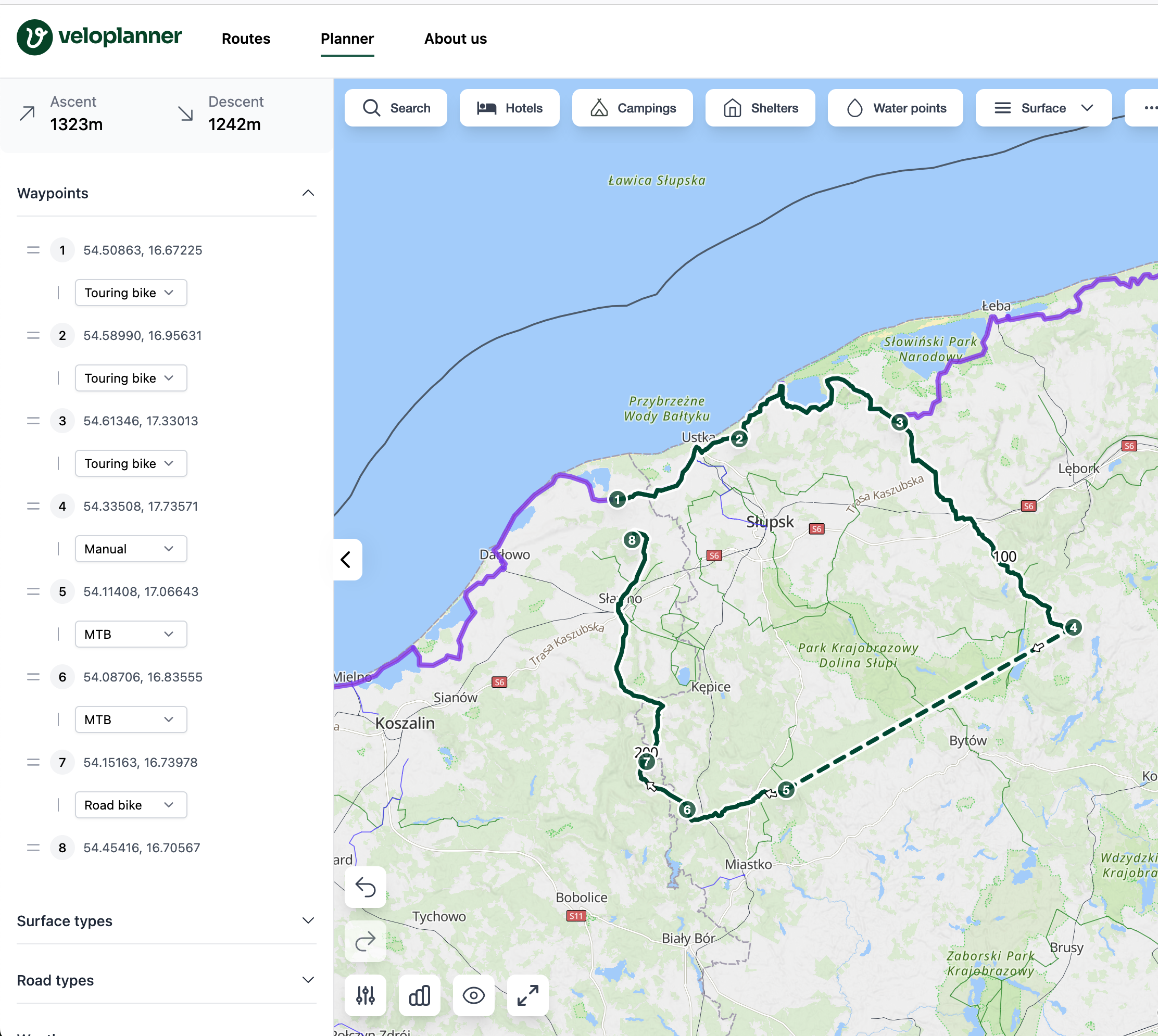
Nico I'v added waypoints list and a way to change each segment profile. Do you think we should still have button to apply newly selected to whole route? I think current implementation is more flexible. R2-Tom What do you think? I'm tagging you since you voted on this task :)

Mar 31, 2025

Kacper Golinski Well done, great implementation! I only have one feedback since this already messed up a few routes: Example: WP1 --> WP2 gravel, then WP2 --> WP3 road. When moving WP2 both profiles change to the default profile, messing up the whole route even though the only action was moving a WP and not initiating a profile change. Suggestion: Keeping the initial profiles (gravel and road) when moving waypoints, only allowing profile changes of existing routes through the new feature you added.

Apr 3, 2025

Kacper Golinski I like it the way it is implemented. I agree, that it would be better to keep the selected profile if you drag and drop a waypoint.

Jun 30, 2025

Kacper Golinski R2-Tom I think I now have a good suggestion for the profile issue. It is still very annoying to add a waypoint because it will usually do some unwanted rerouting within that section. That means right now you have to first look up the used profile of the route, then choose that profile and then click "Include in route". That's way to many steps... So my suggestion would be: When right clicking on the route itself, change "Include in route" to "Add waypoint on route". This means: - "Include in route": Do a routing to that point according to the selected routing profile (as it is now) - "Add waypoint on route": Just add a waypoint exactly on the route without any rerouting or change of profile. The rerouting or change of profile only applies once that new waypoint is dragged somewhere new.